Under Site Collection Administration > Site Collection Audit Settings
Turn on all events needed for audit, but remember this will significatly increase the size of your content database.
So consider turning on Audit Log Trimming which is end of the month by default
https://support.office.com/en-US/article/Configure-audit-settings-for-a-site-collection-F5A346D0-EE0F-4412-A5E6-D9B5ABAA1012
Next, lets create some activity using built-in document library.
Add and delete document.
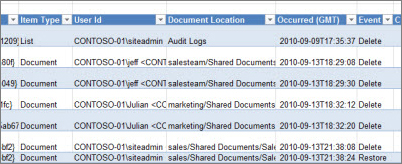
Back to Site Collection Administration > Audit Log Reports > Deletion
Save report (Suggestion: Create a new document library for audting)
Open Report using Excel or Excel Web App
